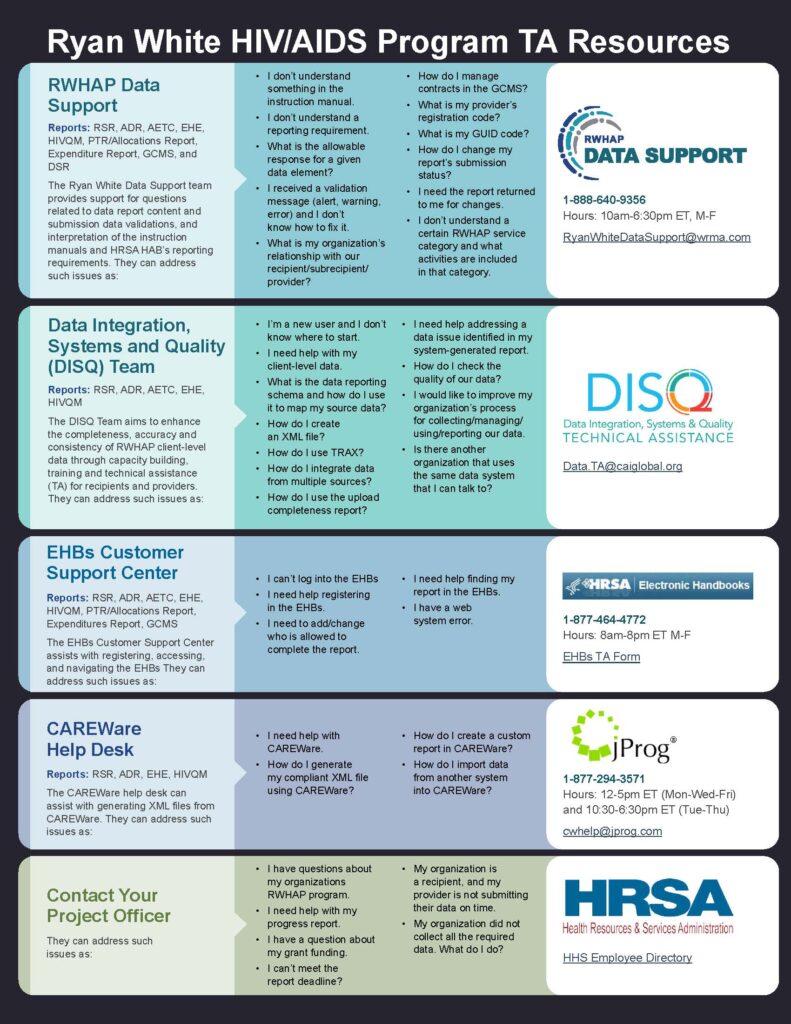
The RSR and ADR resources featured below are intended to support the RWHAP field with high quality 2025 data. Please email DISQ with any inquiries about additional resources or webinar recordings, or subscribe to the DISQ newsletter for updates.
Ryan White HIV/AIDS Program Services Report (RSR) Submission Resources
The Ryan White HIV/AIDS Program Services Report (RSR) is the HRSA HIV/AIDS Bureau's client-level data reporting system. All (Parts A through F) funded recipients (grantees) and sub-recipients (providers) must submit an RSR data report each year via the Electronic Handbooks.
RSR Data TA Brochure
TA Resources for the Ryan White HIV/AIDS Program Services Report (RSR) Brochure and Timeline: this brochure outlines technical assistance and training available to Ryan White grantees for the ADAP Data Report. It also includes the ADR submission timeline.
In Focus Guides
RSR eUCI: guidelines for creating and encrypting the Unique Client Identifier (eUCI). Encryption of the eUCI must be included in the Ryan White Services Report (RSR) and ADAP Data Report (ADR) client-level data XML files.
RSR Upload Completeness Report: information on how to use the Upload Completeness Report (UCR). This becomes available in the RSR Web System once client level data is uploaded.
RSR Validations for Client-Level Data: summary of RSR validation checks initiated upon upload of a client level data report, including what triggers an Error, Warning, or Alert during the data validation process.
TRAX Resources
Using TRAX to Create Your RSR Client-Level Data File: this document provides information on how to use TRAX to create the RSR Client-Level Data File. Included are resources to get a better understanding of the RSR’s required data elements and where to locate them in your data system (s). The document also includes some common issues TRAX users encounter and how to resolve them.
TRAX Application Manual: a manual that outlines the basics of creating an XML file for the RSR with TRAX.
TRAX Application Package and Manual: a suite of resources that includes:
- CHEX (revised 02/04/26)
- RSR Crosswalk
- TRAX Sample Files
- Blank Template Files (updated March 2026)
- TRAX Application Manual
Webinars
RSR The Basics Webinar: this webinar features an overview of the RSR terminology and the three components of the RSR: the RSR Recipient Report, the Provider Report, and the Client Level Data (CLD) Report. We also review the 2025 RSR submission deadlines and how to access available resources.
Using CAREWare for RSR Reporting: in this webinar, presenters from jProg (the CAREWare software developers) share tips and best practices for using CAREWare for RSR reporting.
Changes to the 2025 RSR Client-Level Data: this webinar and Q&A session will walk through changes to the 2025 RSR Client-level Data, including changes to the reported data elements and response options, creation of the client unique client identifier (eUCI), and changes to validations in the RSR system.
Other Resources
RSR Instruction Manual: this is the final, 508-compliant 2025 RSR Instruction Manual.
RSR Crosswalk: table for use by providers in creating their Ryan White Services Reports (RSRs) from their electronic health records (EHR) - specifically, to crosswalk EHR and RSR data elements.
eUCI Application User Guide: the encrypted Unique Client Identifier (eUCI) and its application in RWHAP data systems.
eUCI Generator: this ZIP file contains the eUCI executable file and the associated DLL. The executable file is an external application that allows providers to generate eUCIs by importing a .CSV file containing the required eUCI components (first and last name, full date of birth, and sex at birth code). The DLL can be used by developers of RSR-Ready and ADR-Ready systems, as well as by recipients or providers with large data systems, to embed eUCI generation directly within their systems.
RSR Schema Implementation Guide and Data Dictionary
RSR Validation Report All System Validation Messages: data validation checks related to the RSR Recipient Report, Provider Report, and client-level data file. This file lists the 2025 messages.
Appendix A: Required Client-Level Data Elements for RWHAP Services: this resource is an excerpt from the RSR Instruction Manual.
RSR-Ready Data Systems Vendor Information: many software systems, including EHRs, lab systems and case management systems, generate the RSR. These systems also have internal validations and reports that allow the provider to check the quality and completeness of the RSR data before upload. This document presents a table with the following information about the various RSR-Ready Systems:
- Build Number
- Number of users in the most recent submission
- Vendor websites and contact information
- Release timing of versions that create a compliant file for the upcoming submission
For more information about a particular data system, please contact the appropriate data system vendor. For general questions about selecting an RSR-Ready System, email the DISQ team.
AIDS Drug Assistance Program Data Report (ADR)
The ADAP Data Report (ADR) is an annual reporting requirement for AIDS Drug Assistance Programs (ADAPs). The ADR provides data on individuals served, services being delivered, and costs associated with these services. Data are used to monitor client health outcomes, monitor ADAP activities in relation to HIV needs across the U.S. and track progress in relation to national HIV/AIDS goals.
ADR Data TA Brochure
TA Resources for the AIDS Drug Assistance Program Data Report (ADR) Brochure and Timeline: this brochure outlines technical assistance and training available to Ryan White grantees for the ADAP Data Report. It also includes the ADR submission timeline.
In Focus Guides
Please check back for updated 2025 ADR reporting In Focus guides.
TRAX Resources
Please check back for the 2025 ADR TRAX package and manual.
Other Resources
2025 ADR Instruction Manual: this is the final, 508-compliant 2025 ADR Instruction Manual.
ADR Validation Report Document System Messages: ADR data validations, notifications, approvals, and their rationale.
ADR XML Schema Implementation Guide
Schema XSD Files
ADR Merge Rules: the ADR merger of client-level data XML files for EHR data elements.
Webinars
Changes to the 2025 ADR Client-level Data: this webinar and Q&A session reviewed changes to the 2025 ADR Client-level Data, including changes to the reported data elements and response options, creation of the client unique client identifier (eUCI), and changes to validations in the ADR system.
Reviewing Your Data at Upload: Tools in the ADR Web System and the Check Your XML Feature: this webinar provides an explanation for how to use the Check Your XML feature to check ADR data quality prior to submission. DISQ and RWHAP Data Support cover other features of the ADR Web System available to review data prior to submission, including the upload completeness report (UCR) and the validation reports.
HIV Quality Measures (HIVQM) Module
The HIVQM Module is a tool developed by HAB that allows recipients and subrecipients to enter their HAB performance measures and continually monitor their progress in improving health outcomes for people with HIV. HIVQM Module users can generate summary reports and compare their progress with other users regionally, nationally or by RWHAP Part.
HIV Quality Measures Module (HIVQM) Instruction Manual: this is the 2026 HIVQM manual to support data submissions.
HIVQM Template for Imports: if you are interested in importing a file to submit the HIVQM, you can use this template of the file to get started. Please reach out to DISQ if you have any questions on using this tool by contacting DISQ via email.